Smart link routing
Send users to different destinations based on their device, location, or browser. iOS users go to the App Store. Android users go to Google Play. Desktop users go to your web app. One link that works for every user automatically.
Stop losing users between campaigns and product. Track what works, fix what doesn’t, and keep every touchpoint clean.
Share one branded link from email, in-app, or SMS so every user starts in the right place.
Route users to docs, product tours, or help articles without changing the original link.
See which onboarding step drives the most clicks, completions, and signups.
Send new users a branded short link that takes them straight to your setup guide, tutorial video, or in-app onboarding flow. One clean link in their welcome email or SMS. No hunting for documentation. No confusing generic URLs. Just a smooth start to their experience with your product.
User cannot find the invite email after signup.
Ship a new flow without changing the link in docs.
Share the right help article before a ticket is created.
Put QR codes on products for setup and support. Update destinations anytime—no reprinting or recalls needed.
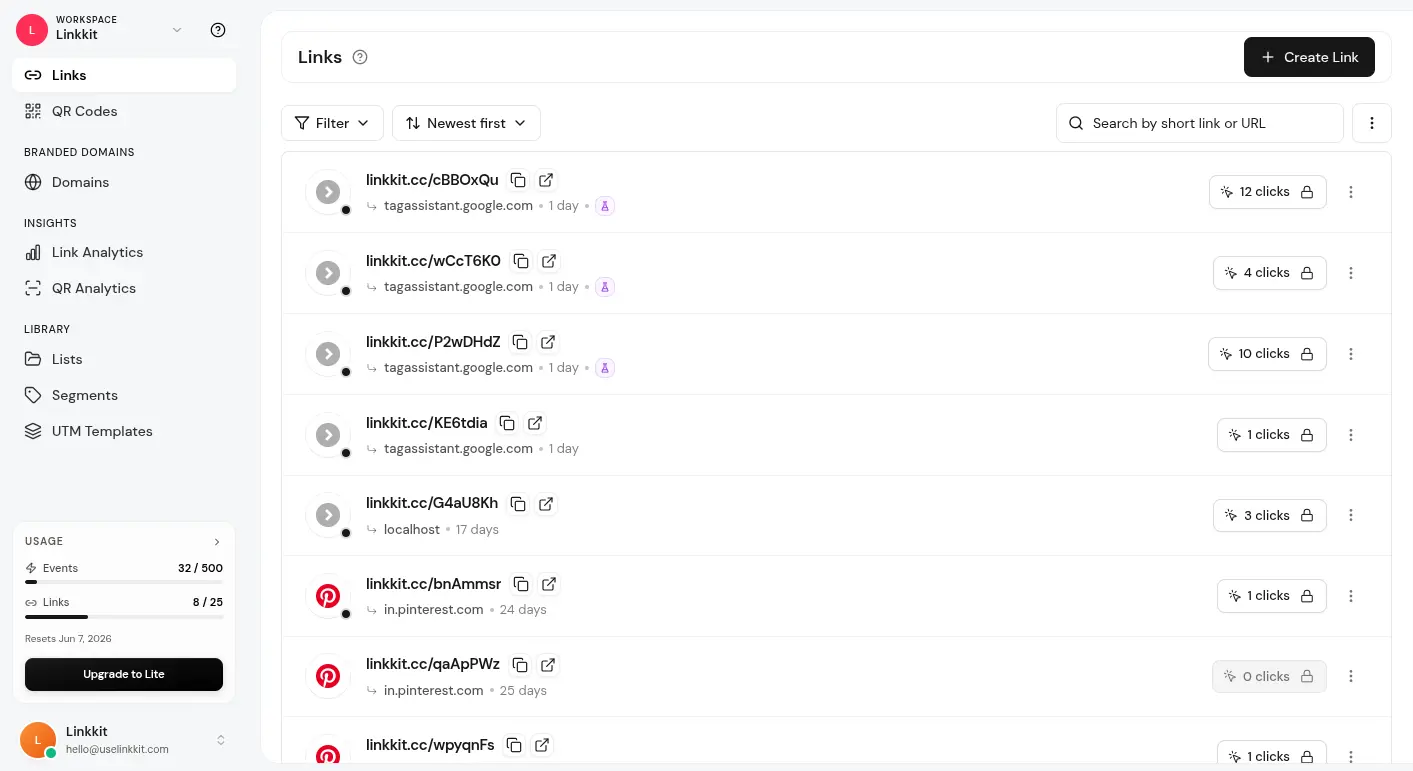
Track clicks and scans in real time. See which campaigns and channels drive the most qualified users.
From product launch to post-sale support, Linkkit covers every touchpoint your tech team manages every single day.
Send users to different destinations based on their device, location, or browser. iOS users go to the App Store. Android users go to Google Play. Desktop users go to your web app. One link that works for every user automatically.
Create a short link once and update where it sends users any time a page moves, a feature launches, or documentation changes. No broken links in your emails, docs, or product packaging. Ever.
Print QR codes on hardware boxes, manuals, and marketing materials. When your setup guide moves or your support portal changes, just update the destination. The code on the box never changes.
Manage short links and QR codes for every product launch, feature release, and marketing campaign from one workspace. Tag by product, team, or quarter so nothing gets lost and everyone knows what is live.
See in real time which links are getting clicked, which QR codes are being scanned, and which channels are driving the most signups. Use that data to make smarter decisions every sprint.
Every link you share goes out on your own branded domain. Users see docs.yourproduct.com or get.yourproduct.com instead of a generic shortener. More trust. More clicks. Better experience.
One platform for product, marketing, support, and every team that ships and supports software or hardware.
Share feature announcements, changelog updates, and beta invites with branded short links that track every click and tell you exactly who is engaging with your releases.
Share API docs, SDK downloads, and integration guides with clean branded links in emails, social posts, and developer forums. Track which resources your community actually uses.
Run product launch campaigns, paid ads, and email sequences with short links that stay trackable, updatable, and on brand from the first click to the last conversion.
Send users branded short links to troubleshooting guides, setup videos, and help articles. Update where the link goes any time your documentation changes. No broken links in support tickets.
Print QR codes on product boxes, quick start guides, and warranty cards. Link to setup tutorials, registration pages, or support portals. Update the destination any time without touching the physical product.
Share product demos, case studies, and proposal links with prospects using branded short links that tell you exactly when someone clicked and how engaged they were.
“We use Linkkit QR codes on every product box and update destinations anytime without reprinting.”
Marcus T.
Free to start. No ads on your links. No contracts. Just clean short links and QR codes that help your tech team deliver better user experiences every single day.