
Webhooks
Receive real-time notifications for events
Webhooks allow Linkkit to send real-time event notifications to your application whenever specific actions occur in your workspace.
Instead of constantly polling the API for updates, webhooks push data instantly to your server — making your integrations faster, more efficient, and event-driven.
With Linkkit Webhooks, you can automate workflows when links are clicked, created, updated, deleted, or when QR codes are scanned.
What Are Webhooks?
A webhook is an HTTP callback that sends a POST request to a URL you control whenever a selected event happens in Linkkit.
For example:
A short link is clicked
A new link is created
A link is updated
A link is deleted
A QR code is scanned
When these events occur, Linkkit sends structured JSON data to your webhook endpoint.
Why Use Webhooks?
Webhooks allow you to:
Trigger automations in real time
Update CRM systems instantly
Send internal notifications when links are clicked
Sync link data with external dashboards
Track QR scans automatically
Trigger marketing workflows
They are ideal for SaaS platforms, automation tools, marketing systems, and analytics dashboards.
Setting Up Webhooks in Linkkit
You can configure webhooks directly from your dashboard.
Step 1: Navigate to Webhooks
Log in to your Linkkit account
Go to Settings → Webhooks
Click Add Endpoint
(As shown in your dashboard UI)
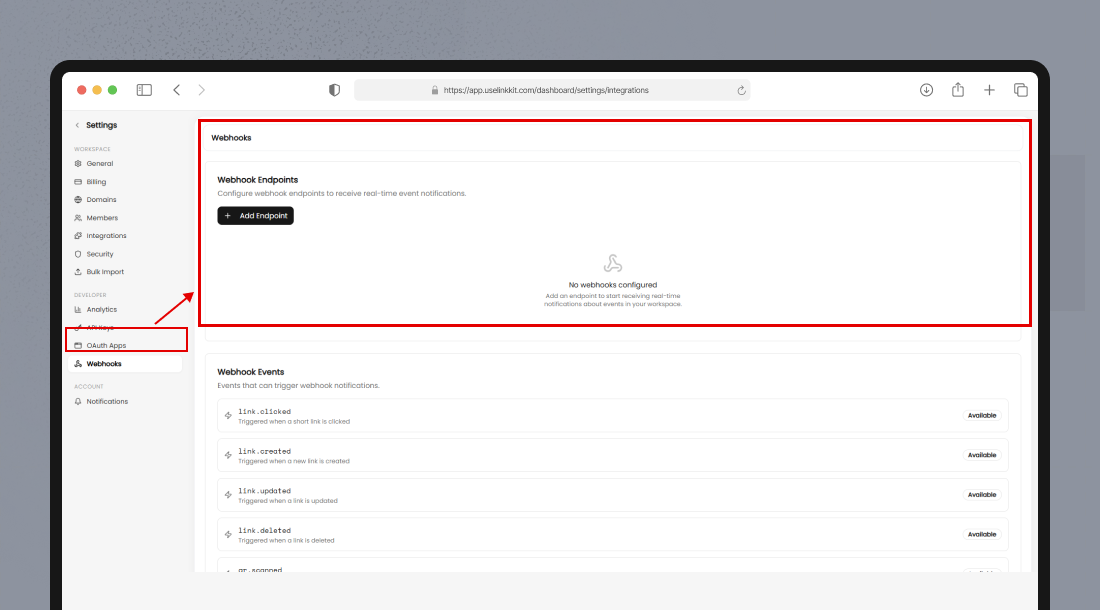
Step 2: Add a Webhook Endpoint
You’ll need to provide:
Endpoint URL – The public URL where Linkkit should send event data
Events to Subscribe – Select the events you want to receive
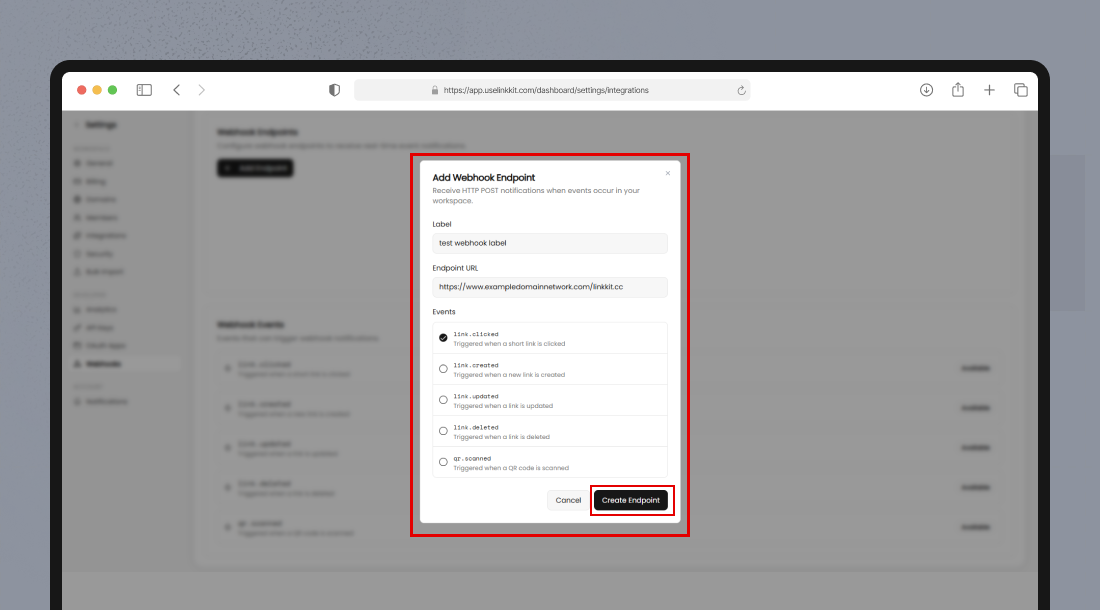
After saving, Linkkit will begin sending POST requests to your endpoint whenever selected events occur.
Available Webhook Events
Based on your current system, Linkkit supports the following events:
link.clicked
Triggered when a short link is clicked.
link.created
Triggered when a new link is created.
link.updated
Triggered when an existing link is updated.
link.deleted
Triggered when a link is deleted.
qr.scanned
Triggered when a QR code associated with a link is scanned.
You can subscribe to one or multiple events per webhook endpoint.
Webhook Request Format
All webhook events are sent as HTTP POST requests with JSON payloads.
Example Payload (link.clicked)
{
  "event": "link.clicked",
  "timestamp": "2026-02-27T12:45:00Z",
  "data": {
    "link_id": "lnk_847392",
    "short_url": "https://lkkt.in/summer-sale",
    "destination_url": "https://example.com/product",
    "segment": "Black Friday 2026",
    "campaign": "Q4 Sales",
    "click_location": "India",
    "device": "Mobile"
  }
}
How Your Server Should Respond
Your endpoint must:
Accept POST requests
Parse JSON payloads
Return a 200 OK HTTP status
If your server does not return a successful status code, Linkkit may retry the webhook delivery.
Webhook Security Best Practices
To keep your integration secure:
Use HTTPS
Always use secure HTTPS endpoints.
Validate Incoming Requests
Verify webhook signatures (if enabled in future updates) or restrict requests by IP if applicable.
Handle Idempotency
Ensure your system can safely process duplicate events in case of retries.
Log Events
Maintain logs for debugging and monitoring failed webhook deliveries.
Testing Webhooks
Before going live:
Use tools like Postman or ngrok to test endpoints locally
Confirm your endpoint correctly parses JSON
Simulate events by creating or clicking test links
Make sure your system handles all selected event types properly.
Common Webhook Errors
Error | Cause |
|---|---|
400 Bad Request | Invalid endpoint configuration |
401 Unauthorized | Endpoint requires authentication |
404 Not Found | Incorrect webhook URL |
500 Server Error | Your server failed to process the request |
If webhooks fail repeatedly, review your endpoint configuration and server logs.
When Should You Use Webhooks vs API?
Use Case | API | Webhooks |
|---|---|---|
Fetch link data manually | ✅ | ❌ |
Real-time click notifications | ❌ | ✅ |
Scheduled data sync | ✅ | ❌ |
Instant automation triggers | ❌ | ✅ |
Webhooks are ideal for real-time automation.
The API is best for on-demand data retrieval.
Summary
Linkkit Webhooks enable real-time automation by sending event-based notifications directly to your application.
With support for:
Link clicks
Link creation
Link updates
Link deletion
QR scans
You can build powerful integrations that respond instantly to activity inside your Linkkit workspace.