
OAuth Applications
Create OAuth apps for third-party integrations
Linkkit supports OAuth 2.0, a secure and industry-standard authorisation protocol that lets developers build apps which can access Linkkit user data without exposing user credentials or API keys.
OAuth enables third-party applications to request permission, so users can authorise integrations safely and conveniently.
This page explains how Linkkit’s OAuth works — from registering your app to implementing the authorisation flow and securely handling tokens.
What Is OAuth?
OAuth (Open Authorisation) allows applications to access user-authorised data without needing to store or manage usernames and passwords.
In Linkkit, OAuth enables your app to:
Access a user’s links
Retrieve analytics and campaign data
Create or update user resources
Build integrations that act on behalf of a user
This approach is safer and more flexible than sharing API keys.
Why Use OAuth with Linkkit?
OAuth is recommended when:
You’re building third-party integrations
Users need to authorise access securely
You want multi-user application access
You want to follow modern security standards
OAuth removes the need for users to share their API keys, improving security and user experience — especially for public or marketplace apps.
Registering Your OAuth App
To start, you must register your app in your Linkkit dashboard.
Steps to Register
Log in to your Linkkit account
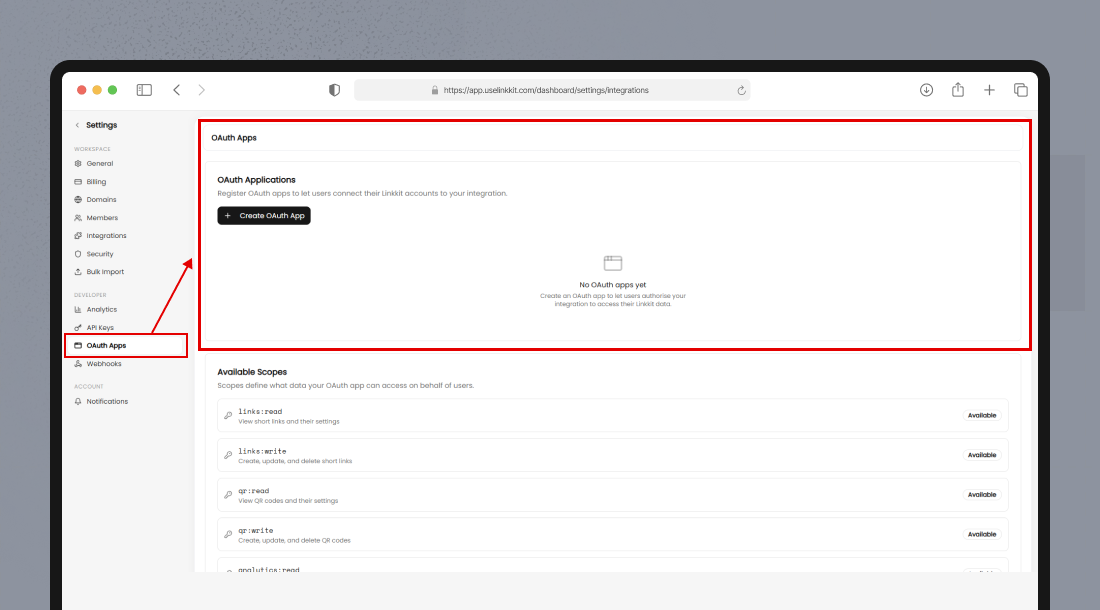
Navigate to Settings → OAuth Apps
Click Add New App
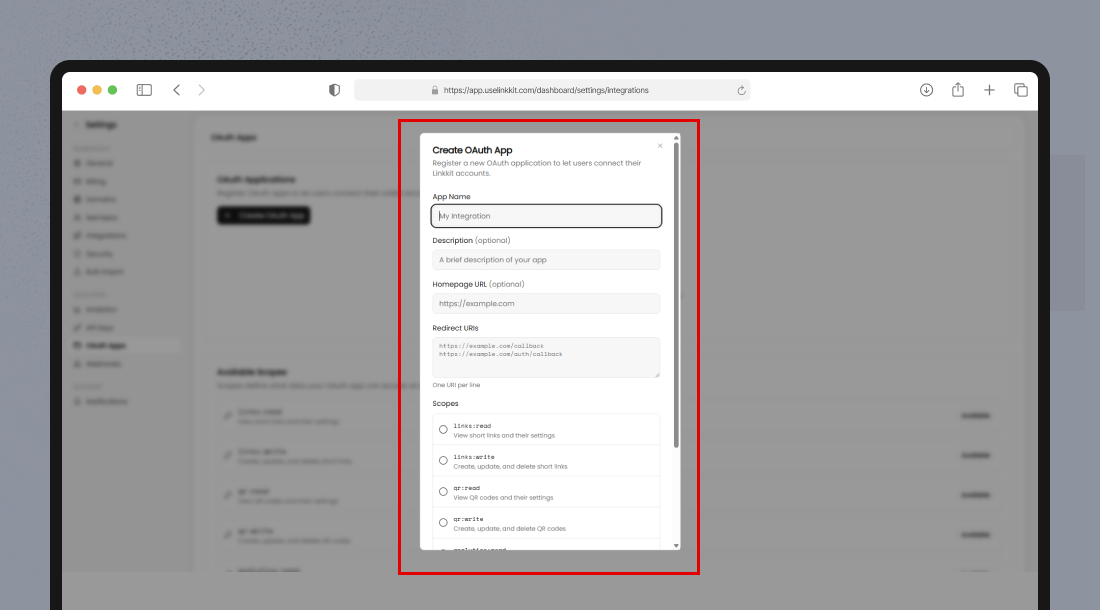
Enter required details:
App name
Redirect URI(s)
Description (optional)
Logo (optional)
Submit to save
When finished, you will receive:
Client ID
Client Secret
These credentials uniquely identify your OAuth application and must be kept confidential.
Authorisation Flow (OAuth 2.0)
Linkkit uses the standard Authorisation Code Grant flow — the most common secure OAuth pattern for server-based apps.
Redirect Users to Authorise
Direct users to Linkkit’s authorisation page:
https://api.uselinkkit.com/oauth/authorize?
response_type=code
&client_id=YOUR_CLIENT_ID
&redirect_uri=YOUR_REDIRECT_URI
&state=SECURE_RANDOM_STRING
&scope=REQUESTED_SCOPES
URL parameters:
Parameter | Required | Description |
|---|---|---|
| Yes | Your app’s Client ID |
| Yes | Must exactly match one of the registered URIs |
| Yes | Must be |
| Optional | Permissions your app needs |
| Recommended | Secure random string to prevent CSRF |
Upon consent, users are redirected back with:
?code=AUTH_CODE&state=YOUR_STATEThis is the authorisation code you’ll exchange for tokens.
Exchange Authorization Code for Tokens
Now send a POST request to exchange the code for an access token and a refresh token:
POST
https://api.uselinkkit.com/oauth/tokenBody (application/x-www-form-urlencoded):
grant_type=authorization_code
&code=AUTH_CODE
&redirect_uri=YOUR_REDIRECT_URI
&client_id=YOUR_CLIENT_ID
&client_secret=YOUR_CLIENT_SECRET
Successful Response:
{
  "access_token": "ACCESS_TOKEN",
  "refresh_token": "REFRESH_TOKEN",
  "expires_in": 3600,
  "scope": "granted scopes"
}access_token— Used to call the Linkkit API on behalf of the userrefresh_token— Used to refresh the access token when it expires
Use the Access Token
With a valid access token, you can make authenticated API requests like:
curl -H "Authorization: Bearer ACCESS_TOKEN" \
"https://api.uselinkkit.com/v1/links"
The token gives your app temporary authorised access to the user’s data.
Token Refresh Flow
Access tokens expire regularly. When they do, use the refresh token to obtain a new one.
POST
https://api.uselinkkit.com/oauth/tokenBody:
grant_type=refresh_token
&refresh_token=REFRESH_TOKEN
&client_id=YOUR_CLIENT_ID
&client_secret=YOUR_CLIENT_SECRET
Response:
{
  "access_token": "NEW_ACCESS_TOKEN",
  "expires_in": 3600
}
Refresh tokens help maintain long-running sessions safely without asking the user to re-authorise.
Scopes
Scopes define what level of access your app requests.
Example scopes might include:
Scope | Description |
|---|---|
| Read user links |
| Create, update, and delete links |
| Read link analytics |
| Access user segments |
| Manage campaigns |
Always request the minimum scopes required — it increases user trust and improves authorisation conversion.
Handling OAuth Errors
OAuth endpoints may respond with structured error messages, such as:
{
  "error": "invalid_grant",
  "error_description": "code_invalid_or_expired"
}
Common errors include:
Error | Meaning |
|---|---|
| Required parameter missing |
| Invalid client ID or secret |
| Code rejected or expired |
| The client is not allowed the requested grant |
| Requested scopes not supported |
Ensure to handle errors gracefully in your application UI and backend logic.
Security Best Practices
Follow these guidelines to secure your OAuth implementation:
Store client secrets securely — never expose them in frontend code
Use state parameters to prevent CSRF
Validate redirect URIs
Protect refresh tokens securely
Use HTTPS for all OAuth requests
Summary
Linkkit’s OAuth system enables secure third-party access using the Authorisation Code flow. It lets you:
Authenticate users without exposing passwords
Request limited scopes of access
Refresh access tokens safely
Build scalable integrations without API key sharing
OAuth is perfect for marketplace apps, analytics platforms, dashboards, and automation tools.